Microsoft is transitioning migration project creation from Migration Hub to the Microsoft Admin Center (MAC) to provide a unified, modern migration experience.
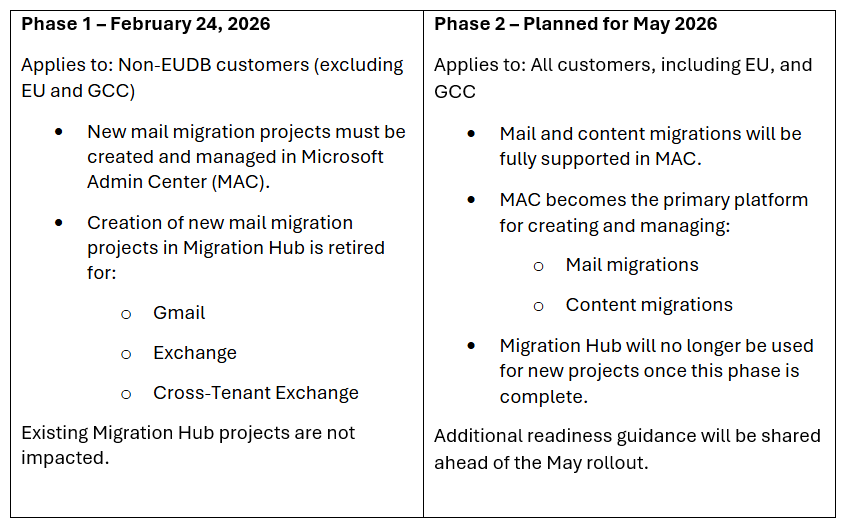
- Mail migrations are live in MAC for nonEU Data Boundary (nonEUDB) customers starting February 24, 2026; EU and GCC will follow in a later phase.
- By May 2026, both mail and content migrations will be available in MAC for all customers (including EU and GCC), and MAC will be the primary platform for new projects.
- Customers on track to complete migrations by May 31, 2026, can continue using Migration Hub (no move required).
Rollout timeline and regional availability
Important note – Customers completing by May 31, 2026
- Customers who are on track to complete their migrations by May 31, 2026, will remain on Migration Hub.
- These customers are not required to move their projects to MAC.
Action required
- For nonEUDB customers, use MAC for all new mail migration projects (effective February 24, 2026).
- EU and GCC customers can continue using Migration Hub until MAC enablement in May 2026.
- Partners and customers should prepare to use MAC for both mail and content migrations by May 2026.
Key benefits for customers with MAC
With MAC, customers will have a streamlined experience with migration project setup and support resources in one place, delivered through a modern and familiar user interface.
- Centralized experience: Create, manage, and monitor migration projects in one place.
- Consolidated guidance: Access migration documentation and support resources from the same workflow.
- Modern UI: Consistent with the Microsoft Admin Center experience and easier to navigate.
- Customer-controlled visibility: Customers control what data is shared with FastTrack and can choose which migration type and which batches FastTrack monitors.
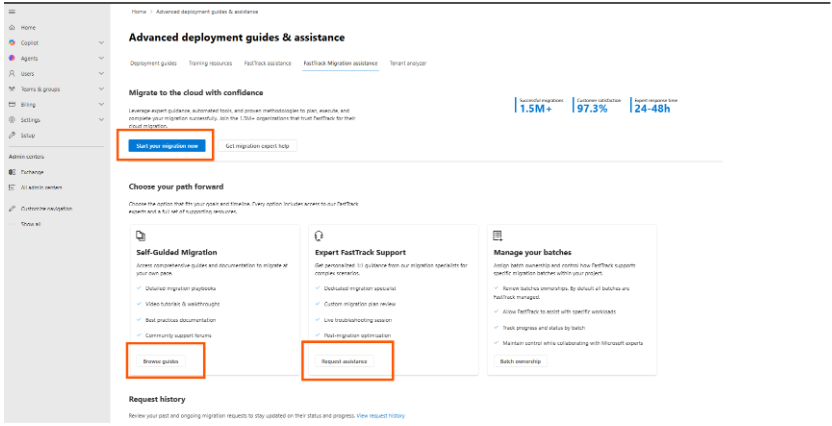
- Simple onboarding: In MAC, customers grant consent to FastTrack by selecting Start your migration now on the Advance Deployment and Assistance page under Setup.
- Single entry point for help and learning: Customers can use the same page to access Self-Guided Migrations content and connect with the Migration Support Team.
- Familiar batch management: Customers can start, stop, and manage batches using familiar interfaces such as the Exchange admin center and Migration Manager (coming soon).
Grant consent, contact the Migration Support Team, and learn using Self-Guided Migrations
Manage Exchange Batches in EAC

If you have any questions, feel free to contact Partner Support.

