AI Business Solutions & Security Insights in Partner Center now gives you access to SMB tenants (25+ M365 seats) across the Secure Productivity tabs, adding ~700,000 tenants across ~70,000 partners, with major distributors seeing a 400X increase in tenants.
This expansion significantly increases the opportunity surface area—especially for CSP partners—by surfacing high‑value, high‑propensity SMB customers, and your associated tier 2 resellers, with upcoming renewals. Most critically, you now have the data to identify high propensity SMB tenants for B-SKU bundles across Copilot for Business as well as the Defender and Purview Suite.
This release includes:
- SMB Data for Secure Productivity for all tenants with more than 25 M365 seats.
- Microsoft Field-Aligned Recommendations for Secure Productivity including new data on total seats, dominant licensing, and usage‑based upsell recommendations for E and B‑SKUs.
- End-end 1 and 2-tier CSP lifecycle management for direct-buy CSPs, indirect providers and resellers with:
- CSP renewal dates for timely outreach
- Tier 2 reseller names for distributor targeting
- Classification of customer relationship by CSP tier (Tier 1 Reseller, Tier 2 Reseller, Tier 1 Distributor)
- Partner Center ID (MPN) filtering for global, multi-region partner organizations
4
. MCI workshop engagement names available via export.
With this release, we also:
- Shipped an outage banner experience, enabling real-time outage notifications to improve transparency.
- Deployed various UX improvements across filters flyouts and customizable download fields.
- Deprecated legacy certificate-based API.
- Sunsetted the FRP Dashboard, transitioning reporting to ASPX.
Feature 1: Multiply your Insights with SMB Data
As a reminder, the Growth Opportunities tabs provide:
- Account classification and targeting across key AI Business Solutions and Security products.
- Workload‑level usage data powering a usage‑to‑revenue propensity model to identify upsell and adoption‑needs.
- Propensity insights for attaching and expanding priority E5 Security products in Purview and Defender.
- Pre‑calculated incentive eligibility with potential earnings to drive clear next‑step actions for high‑propensity tenants.
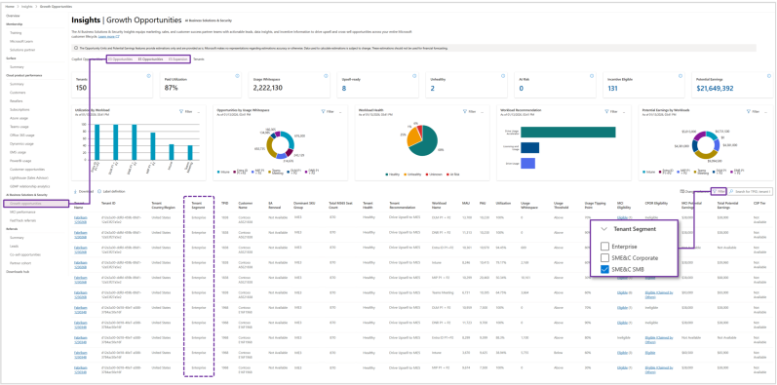
All of these insights will now be
available for SMB tenants (>25+ M365 seats) by default in the E3, E5, and E5 Expansion Opportunities tab's tables, KPIs, and charts. To view only SMB tenants, filter by the
Tenant Segment column.
Feature 2: New Tenant Recommendations including B-SKU Insights
Partners now see four new fields across E3, E5, and E5 Expansion opportunities to guide next best actions:
- Dominant SKU Group: Categorizes the tenant based on its largest license set, including B-SKUs such as Business Basic (BB), Business Standard (BS), and Business Premium (BP).
- Total M365 Seats: Shows total M365 seats to size opportunities and identify whitespace.
- Tenant Health: Labels the tenant as Healthy, Unhealthy, or At Risk.
- Tenant Recommendation: Provides a single best next action based on usage and licensing profile.

Feature 3: New CSP Association Details including Renewals, Tier 2 Reseller Names, and Regional Partner Center ID (MPN) Data:
Partners can now access a comprehensive view of their CSP footprint:
- Largest Seat CSP Renewal: Enables prioritization based on the renewal date for the subscription partners manage with the largest seat count.
- Earliest CSP Renewal: Highlights the most imminent renewal partnermanaged subscription (hidden by default, but can be added via “Change Columns”).
- Partner Name & MPN ID: Gives multiregion partners the ability to segment by the Partner Center ID tied to each tenant.
- T2 Reseller Name: Lets distributors drill into and target their downstream Tier 2 reseller base.

Feature 4: MCI Workshops in download file
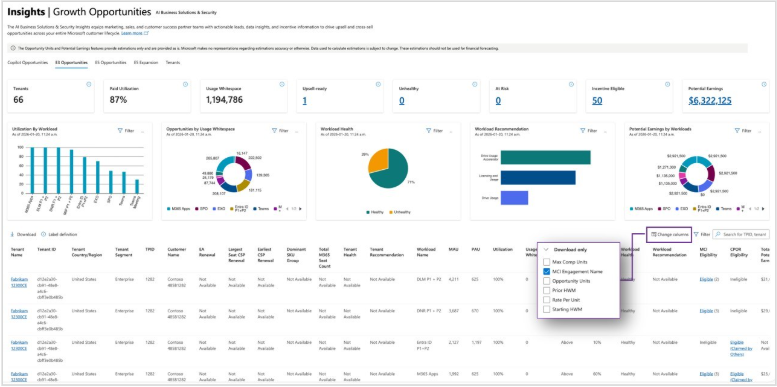
Partners can now export eligible MCI engagement workshop names in one click directly in the download file—eliminating manual tenant-by-tenant validation and reducing the need for separate downloads per opportunity. This makes it faster to target the right customers, prioritize outreach, and collaborate with internal sales teams using a single consolidated export.
Within the Change Columns flyout, under the download-only column selector, MCI Engagement Name is selected by default to add a new column to your export (this does not impact the on-screen table). The exported value contains a comma-separated list of eligible MCI engagement workshop names for each opportunity, enabling easy sharing and faster follow-up. If you prefer not to include this detail in what you share externally, simply uncheck the MCI Engagement Name to remove the column from the export.
Upcoming releases
- Extending Secure Productivity recommendation with AI-driven insights, fallback upsell recommendations, detailed opportunity reasoning and alignment with the new Copilot Engagement Framework/Model
- Tailored tenant B-SKU CPB bundles recommendations for Business Standard/Business Premium + Copilot for Business + Purview Suite
- Augmenting customer targeting with customer sub-segment and industry signals
- …and more!
Known issues and limitations
- Associations and data in the Opportunities tabs are only available for tenants:
- Classified by Microsoft as Enterprise customers, with more than 150 M365 licenses, or
- Classified by Microsoft as Small Medium Enterprise & Channel (SME&C) with more than 25 M365 licenses (Corporate and SMB).
- Reseller names and CSP renewal dates are only available for M365 related subscriptions that you manage.
- Download: Due to the substantial increase in tenants, the download is limited to the top 5000 records for now. Please leverage the UI filters to reduce the volume of data before downloading. If you have substantially more tenants, consider leveraging our API and contact Partner Support for more information.
- The largest partners with many tenants in general may find search, sorting, and filtering marginally slower to load.
- Users mapped to multiple MPNIDs (Partner ID) within their organization (e.g., global users) may see some tenants repeated in the data. This occurs when the same tenant has multiple associations with multiple MPNIDs, which is especially common when there are different MPNIDs used for CPOR and CSP associations, or in cases where one MPNID has different incentive eligibility to the other.
Next steps
- Access: Partners can access the new release experience in two ways: through Partner Center under the Insights workspace, or via our Growth Opportunities link: https://aka.ms/ASPX.
- Documentation: Visit our comprehensive documentation at https://aka.ms/ASPXDocs and select the Secure Productivity section under Growth Opportunities.
- Support
- For any questions, issues, or assistance, please contact us via:

